Felix Szczesny
Game Designer
HANDLE THE WIND
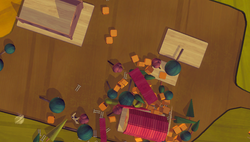
Players control the wind with the movement of their hand. When moving their hands in circles they create a tornado which is able to transport objects. The size and speed of the circle movement defines the size and force of the tornado.
Toynado
 |
|---|
 |
 |
 |
 |
 |
 |
 |
DATE : 4th semester (2020)
DURATION : 3 weeks
TEAM : Meike Strippel, Maria Fleischer, Robin Zitt, Felix Szczesny
COACHES : Prof. Susanne Brandhorst and Prof. Thomas Bremer
TECHNOLOGY : Unity 3D, WebGL
CONSTRAINS : Create a small game playable in browser.
MY PARTS :
-
Workflow planning
-
System design
-
Gameplay programming
-
Feel and balancing of the wind mechanic and physics
PROJECT INFORMATION

A GAME WITH INTUITIVE CONTROLS
What can you do?
- Create tornados by moving your hand in circles
- Control speed, size and force of the tornado
- Make wind with any other mouse movement
- Pull out objects and transport them
- Throw objects out of the tornado
PLAY TOYNADO
WORKFLOW EXAMPLES
Changing the approach
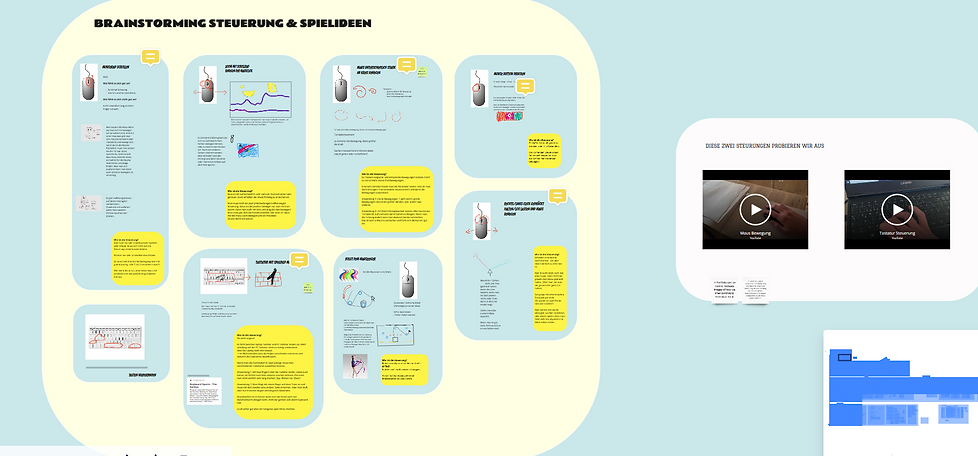
I again proposed how to approach the development. As we would develop the game for WebGL we knew people would generally only have a keyboard, and a mouse to play. We tried to embrace these constraints and brainstormed what kind of controls feel nice with mouse and / or keyboard without thinking about any mechanics. We tried out different movements, pacings, hand positions. We wrote them down and only then started to imagine what mechanics could fit on those controls.
.png)
Quick prototyping & feel of the mechanic
We planned and made 2 prototypes for which we invested 2-3 days each. Both had potential but the tornado one was already very engaging while the second one needed some more work. During this 3 weeks jam we did not focus on the content nor finding the right game loop. We wanted to get the feeling of the controls right.


Home office
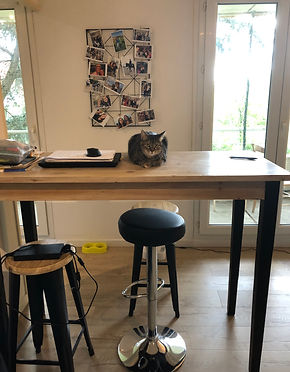
Since we all had to work from our home offices, we were in a call the whole work day long. I must say it worked way better then we expected but I still appreciate so much more working together in the same place. Being able to interact with gestures and read body language is a lot easier and better.

Miro online whiteboard
Miro turned out to be a great tool to work with during the Corona pandemic. It was great to visually organise our work and plan things together with my team.
 |  |  |
|---|---|---|
 |  |  |
MY EXPERIENCE & LEARNINGS
The positives
The time constraint of 3 weeks made us work efficiently and I was stunned how fast we developed two interesting prototypes to chose from. I also learned that approaching game development very differently (starting with the controls only) can lead to interesting results.
Another thing I really liked was that we constantly updated and uploaded a new WebGL version of the game to be tested by our fellow students. It felt good to always have a working state and it helped us to get feedback.
The negatives
After the first week we were very excited about our mechanics and invested a lot in implementing a solid way to recognize the players mouse movements. It made sense to work on the feel of the mechanics first, since it is what stands out, but I would like to have defined a more interesting game loop.
I liked that we chose to create a toy world for the game, but at some point we defined it too clearly as such. I learned from that that defining too much can take away the fantasy and imagination of the player.
The future of Toynado
People have fun with the tornado mechanic and there are already many ideas on how to develop the game further. It would also be interesting to make the game for mobile devices. There is definitely an interest to pursue the development. Since I'm currently working on publishing my project Yeogi Jeogi, I'm reflecting on what makes a marketable product. And I think that Toynado has some potential because it has a strong fantasy, can be explained in one sentence and is very intuitiv.
OTHER PROJECTS


